Introduction
Active Directory plays a huge role in managing user identities and access across enterprise networks, making it a prime target for attackers looking to compromise a network.
This post dives into key indicators of compromise (IoCs) associated with common Active Directory attacks and popular offensive tools like Impacket and Netexec. Whether you’re on the offensive or defensive side, this blog is designed to provide practical insight. Red teamers can use this to see how their attacks show up in logs, while defenders can use it to strengthen their detections.
This is part one of a multi-part detection engineering blog series that I plan on doing, which covers a range of common and advanced attacks targeting Active Directory environments.
This post was made by myself and my good friend Eric Esquivel. Go check his blog out, he does a lot of cool stuff.
Note: Prior knowledge of these attacks is recommended to fully understand the detection logic presented.
Table of Contents
- Detecting Password Spraying
- Detecting AS-REP Roasting
- Detecting Anomalous TGT Requests
- Detecting Kerberoasting
- Detecting Kerberoasting Without Pre-Authentication
- Detecting DCSync Attacks
- Detecting Pass-The-Hash
Detecting Password Spraying
Unlike brute force attacks, password spraying involves trying a small number of commonly used passwords against multiple user accounts. We chose Kerbrute as the tool for this attack because it generates distinct event logs that we can use to detect the activity.
Tool: Kerbrute
Command:
./kerbrute passwordspray usernames.txt "bP@ssw0rd" -d testlab.local --dc dc.testlab.local
When the spray is successful, two Event ID 4768 logs are typically generated for each account. The first log will have a Client Address of 192.168.108.129, and the second will show ::ffff:192.168.108.129. This is expected behavior due to IPv4 and IPv6 representations.
What stands out is the Ticket Options value: both logs show 0x10, which is highly suspicious. Normally, you’d expect values like 0x40810010 or 0x40810000. This anomaly allows us to create a detection rule.
Example Log 1 — Event ID 4768
A Kerberos authentication ticket (TGT) was requested.

Account Information:
    Account Name:		bob
    Supplied Realm Name:	TESTLAB.LOCAL
    User ID:			TESTLAB\bob

Service Information:
    Service Name:		krbtgt
    Service ID:		TESTLAB\krbtgt

Network Information:
    Client Address:		192.168.108.129
    Client Port:		35136

Additional Information:
    Ticket Options:		0x10
    Result Code:		0x0
    Ticket Encryption Type:	0x12
    Pre-Authentication Type:	2
...
Example Log 2 — Event ID 4768
A Kerberos authentication ticket (TGT) was requested.

Account Information:
    Account Name:		bob
    Supplied Realm Name:	TESTLAB.LOCAL
    User ID:			TESTLAB\bob

Service Information:
    Service Name:		krbtgt
    Service ID:		TESTLAB\krbtgt

Network Information:
    Client Address:		::ffff:192.168.108.129
    Client Port:		49052

Additional Information:
    Ticket Options:		0x10
    Result Code:		0x0
    Ticket Encryption Type:	0x12
    Pre-Authentication Type:	2
...
Detection Rule
- Rule Name: Kerbrute Password Spray
- Query:
winlog.event_data.TicketOptions: "0x10" AND winlog.event_id: "4768"
- Description: Flags Kerberos TGT requests with an abnormal
TicketOptionsvalue of0x10, which is commonly seen during password spraying with Kerbrute.
Detecting AS-REP Roasting
AS-REP Roasting is a well-known technique that targets accounts not requiring Kerberos pre-authentication. With no need to supply credentials, an attacker can request an encrypted TGT and attempt to crack it offline
Tool: Impacket - GetNPUsers
Command:
impacket-GetNPUsers -no-pass -usersfile npusers.txt testlab.local/
When executed, the following characteristics are observed in the resulting Kerberos TGT request (Event ID 4768):
Ticket Encryption Type:0x17(RC4), which is uncommon in modern environments.Ticket Options:0x50800000, not normally seen in legitimate requests.Pre-Authentication Type:0, indicating no pre-authentication was required.
Example Log — Event ID 4768
A Kerberos authentication ticket (TGT) was requested.

Account Information:
    Account Name:		alice
    Supplied Realm Name:	TESTLAB.LOCAL
    User ID:			    TESTLAB\alice

Service Information:
    Service Name:		krbtgt
    Service ID:		    TESTLAB\krbtgt

Network Information:
    Client Address:		::ffff:192.168.108.129
    Client Port:		    44884

Additional Information:
    Ticket Options:		    0x50800000
    Result Code:		    0x0
    Ticket Encryption Type:	0x17
    Pre-Authentication Type:	0
...
Detection Rule
- Rule Name: AS-REP Roasting - GetNPUsers
- Query:
winlog.event_data.TicketOptions: "0x50800000" AND
winlog.event_data.TicketEncryptionType: "0x17" AND
winlog.event_data.PreAuthType: "0" AND
winlog.event_id: "4768"
Detecting Anomalous TGT Requests
Attackers often use tools like Impacket’s getTGT to request a Ticket Granting Ticket (TGT) that can later be used for Pass-The-Ticket (PTT) attacks. These requests generate anomalous Kerberos logs, making them useful for detection.
Tool: Impacket - getTGT
Command:
impacket-getTGT testlab.local/bob:'bP@ssw0rd'
When using getTGT, the TGT request produces an Event ID 4768 log. While this looks like a normal TGT request, certain fields raise red flags:
Ticket Options:0x50800000— unusual for standard TGT requests.Ticket Encryption Type:0x12— standard, but paired with the above option is suspicious.Pre-Authentication Type:2— indicates pre-auth was used, typical for interactive login but not enough to normalize the request.
Example Log — Event ID 4768
A Kerberos authentication ticket (TGT) was requested.

Account Information:
    Account Name:		    bob
    Supplied Realm Name:	TESTLAB.LOCAL
    User ID:			    TESTLAB\bob

Service Information:
    Service Name:		    krbtgt
    Service ID:		    TESTLAB\krbtgt

Network Information:
    Client Address:		    ::ffff:192.168.108.129
    Client Port:		    56732

Additional Information:
    Ticket Options:		    0x50800000
    Result Code:		    0x0
    Ticket Encryption Type:	0x12
    Pre-Authentication Type:	2
...
Detection Rule
- Rule Name: Impacket TGT Request
- Query:
winlog.event_id: "4768" AND winlog.event_data.TicketOptions: "0x50800000" AND winlog.event_data.TicketEncryptionType: "0x12" AND winlog.event_data.PreAuthType: "2" - Description: This log is the result of Impacket requesting a TGT, most likely with impacket-GetTGT. This allows attackers to request TGTs likely to be used with Pass-The-Ticket (PTT) attacks.
Detecting Kerberoasting
Kerberoasting is a technique where attackers request service tickets for service accounts, then attempt to crack them offline. We used Impacket’s GetUserSPNs tool to simulate this attack and identify detectable indicators.
Tool: Impacket - GetUserSPNs
Command:
impacket-GetUserSPNs testlab.local/bob:'bP@ssw0rd' -request
This command causes two suspicious Kerberos logs to be generated:
- A
TGTrequest (Event ID 4768) withTicket Options: 0x50800000andEncryption Type: 0x17 - A
Service Ticketrequest (Event ID 4769) withTicket Options: 0x40810010and `Encryption Type: 0x17
The 4768 log is unique to GetUserSPNs and differs from what is seen with getTGT. The 4769 logalso appears when using getST.
Example Log — Event ID 4768 (TGT Request)
A Kerberos authentication ticket (TGT) was requested.

Account Information:
    Account Name:		    bob
    Supplied Realm Name:	TESTLAB.LOCAL
    User ID:			    TESTLAB\bob

Service Information:
    Service Name:		    krbtgt
    Service ID:		    TESTLAB\krbtgt

Network Information:
    Client Address:		    ::ffff:192.168.108.129
    Client Port:		    51172

Additional Information:
    Ticket Options:		    0x50800000
    Result Code:		    0x0
    Ticket Encryption Type:	0x17
    Pre-Authentication Type:	2
...
Detection Rule 1 — TGT Request
- Rule Name: Kerberoasting with Impacket - TGT Request
- Query:
winlog.event_id: "4768" AND winlog.event_data.TicketOptions: "0x50800000" AND winlog.event_data.TicketEncryptionType: "0x17" AND winlog.event_data.PreAuthType: "2" - Description: Detects the Kerberoasting TGT request behavior from Impacket’s
GetUserSPNs -request. This 4768 log is unique and does not match those generated bygetTGT.
Example Log — Event ID 4769 (ST Request)
A Kerberos service ticket was requested.

Account Information:
    Account Name:		bob@TESTLAB.LOCAL
    Account Domain:		TESTLAB.LOCAL
    Logon GUID:		    {94545896-fc6e-e45f-9932-ce3d48fdfa23}

Service Information:
    Service Name:		bob
    Service ID:		    TESTLAB\bob

Network Information:
    Client Address:		::ffff:192.168.108.129
    Client Port:		51190

Additional Information:
    Ticket Options:		0x40810010
    Ticket Encryption Type:	0x17
    Failure Code:		0x0
    Transited Services:	-
...
Detection Rule 2 — ST Request
- Rule Name: Kerberoasting with Impacket - ST Request
- Query:
winlog.event_id: "4769" AND winlog.event_data.TicketOptions: "0x40810010" AND winlog.event_data.TicketEncryptionType: "0x17" - Description: Detects service ticket requests using RC4 encryption which is typically seen when using
GetUserSPNsorgetSTto perform Kerberoasting.
Detecting Kerberoasting Without Pre-Authentication
This is just like AS-REP roasting, except attackers are able to use the user that does not require pre-authentication to request service tickets to other SPNs by simply changing the target SPN from krbtgt to another SPN. This allows for kerberoasting without credentials. The resulting generated log looks like an AS-REP Roasting generated log except the “Service Name” will not be krbtgt.
Tool: Impacket - GetUserSPNs (no-preauth)
Command:
impacket-GetUserSPNs -no-preauth "alice" -usersfile usernames -dc-host 192.168.108.139 testlab.local/
The resulting log resembles AS-REP Roasting, but with one major difference: the Service Name is not krbtgt — meaning the request was made for an SPN and not a TGT. This allowed us to craft a targeted detection.
Example Log — Event ID 4768
A Kerberos authentication ticket (TGT) was requested.

Account Information:
    Account Name:		    alice
    Supplied Realm Name:	    TESTLAB.LOCAL
    User ID:			    TESTLAB\alice

Service Information:
    Service Name:		    bob
    Service ID:		    TESTLAB\bob

Network Information:
    Client Address:		    ::ffff:192.168.108.129
    Client Port:		    47502

Additional Information:
    Ticket Options:		    0x50800000
    Result Code:		    0x0
    Ticket Encryption Type:	0x17
    Pre-Authentication Type:	0
...
Detection Rule
- Rule Name: Kerberoasting Without Pre-Authentication
- Query:
winlog.event_id: "4768" AND winlog.event_data.TicketOptions: "0x50800000" AND winlog.event_data.PreAuthType: "0" AND NOT service.name: "krbtgt" - Description: Detects Kerberoasting performed against a user with pre-authentication disabled. The presence of a non-krbtgt SPN and PreAuthType
0indicates this unusual ticket request without valid credentials.
Detecting DCSync Attacks
DCSync is a powerful technique which is used to replicate a domain controllers behavior and extract credentials from Active Directory. Both Mimikatz and Netexec support this attack.
Detecting Mimikatz’s DCSync
Tool: Mimikatz
Command:
mimikatz.exe "lsadump::dcsync /user:krbtgt" exit
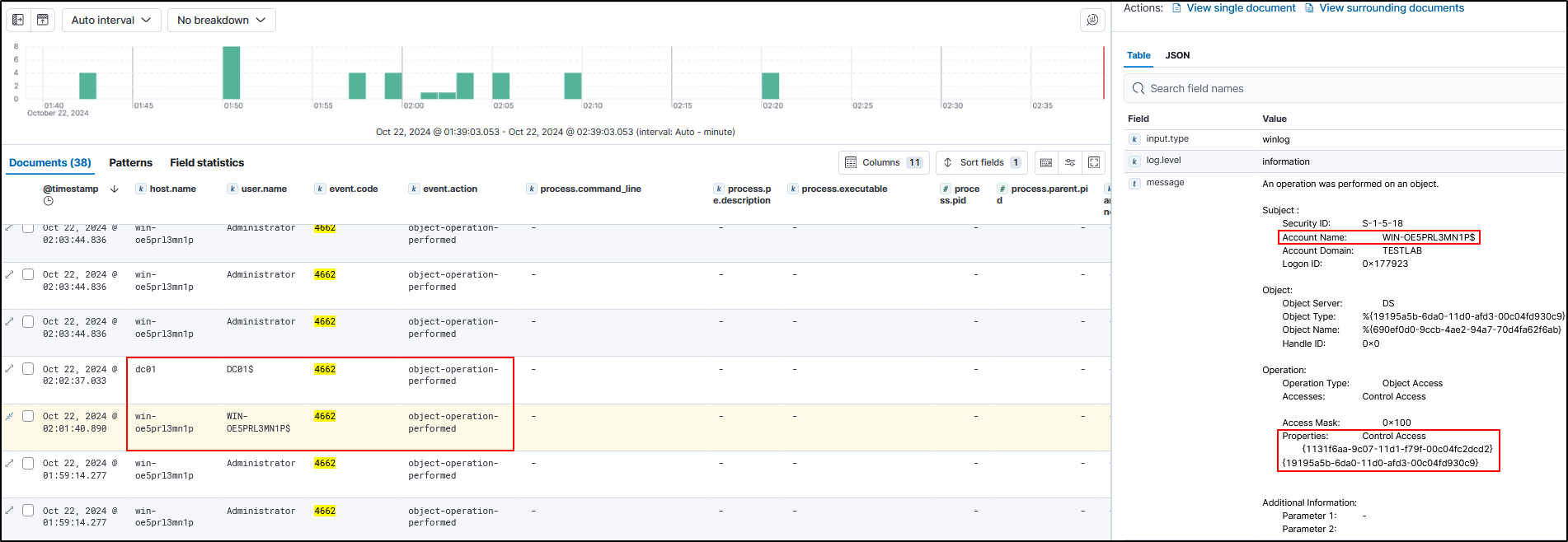
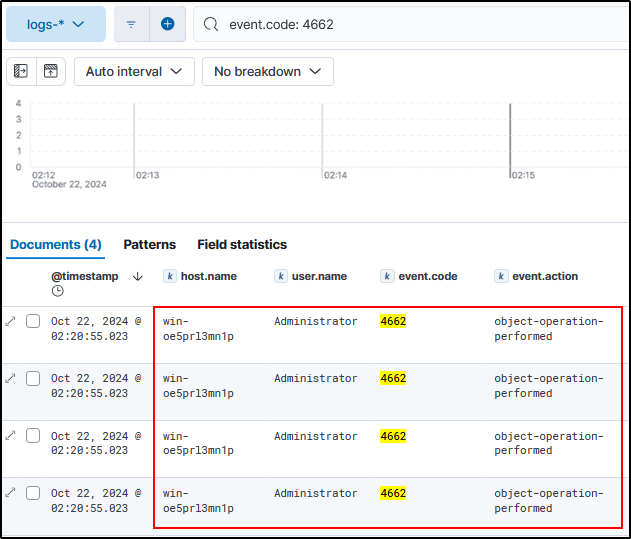
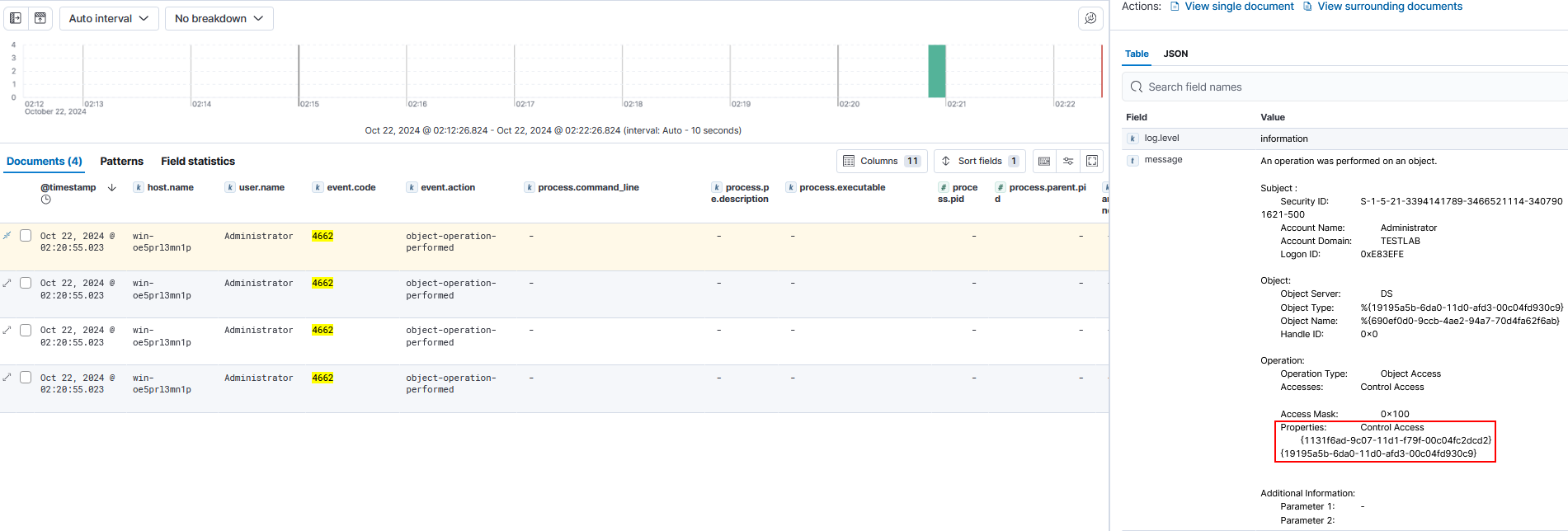
When Mimikatz is used to perform a DCSync, it generates four 4662 logs instead of the usual one that is associated with a typical sync between domain controllers. These logs differ in both the Account Name and the GUIDs used:
- Normal behavior: One
4662log from each DC (Notice it’s only 1 log for each DC, and the account name is the domain controller machine account, and note the GUIDs in the properties field.)
- Mimikatz DCSync: Four
4662logs from a user account with the action “An operation was performed on an object”.
- Account Name
If we were a Domain Administrator user when we run a DCSync attack, we can see the Account Name would be anomalous because it’s supposed to be a Domain Controller machine account performing a sync, not a user account.
Now you could elevate to SYSTEM as a domain controller and then run a DCSync attack which would make the account name look normal. So this is why we also flag the GUIDs as shown below.
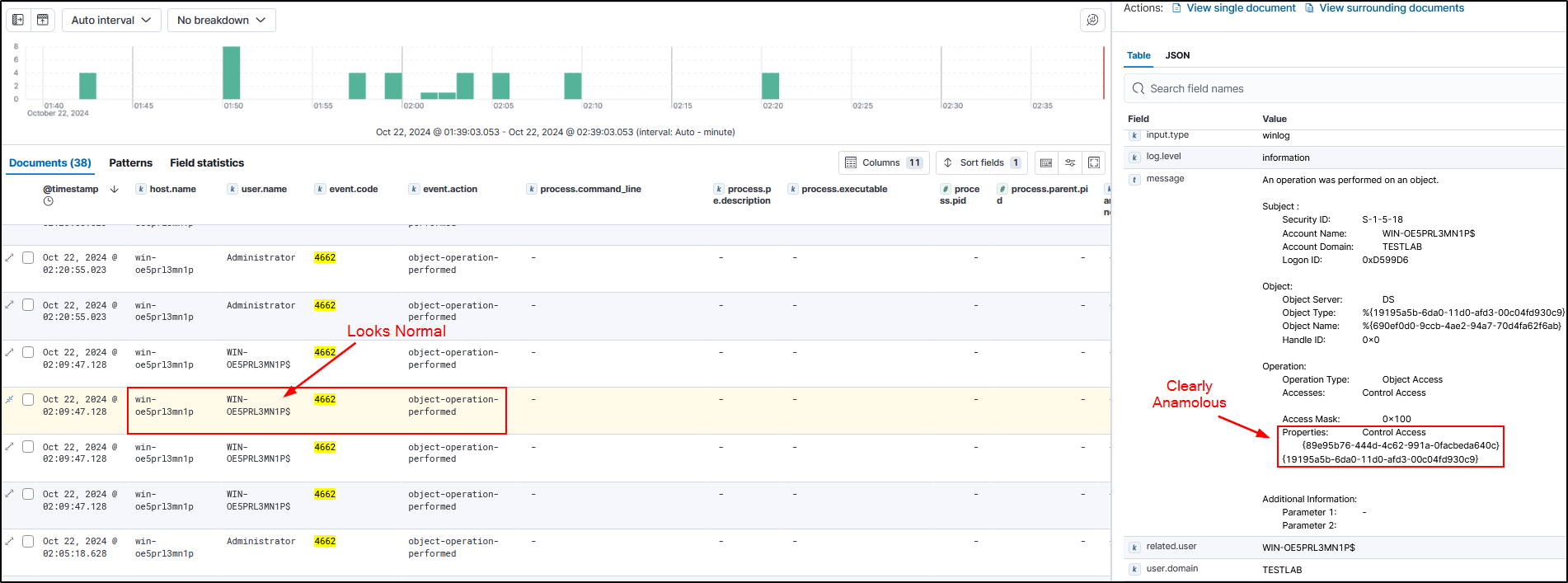
- GUIDs
Next is flagging the GUIDs. As mentioned before, Mimikatz will generate 4 logs.
Logs 1 & 2 will look the same and have the same GUIDs. It will have a GUID of:
1131f6aa-9c07-11d1-f79f-00c04fc2dcd2 — which is DS-Replication-Get-Changes
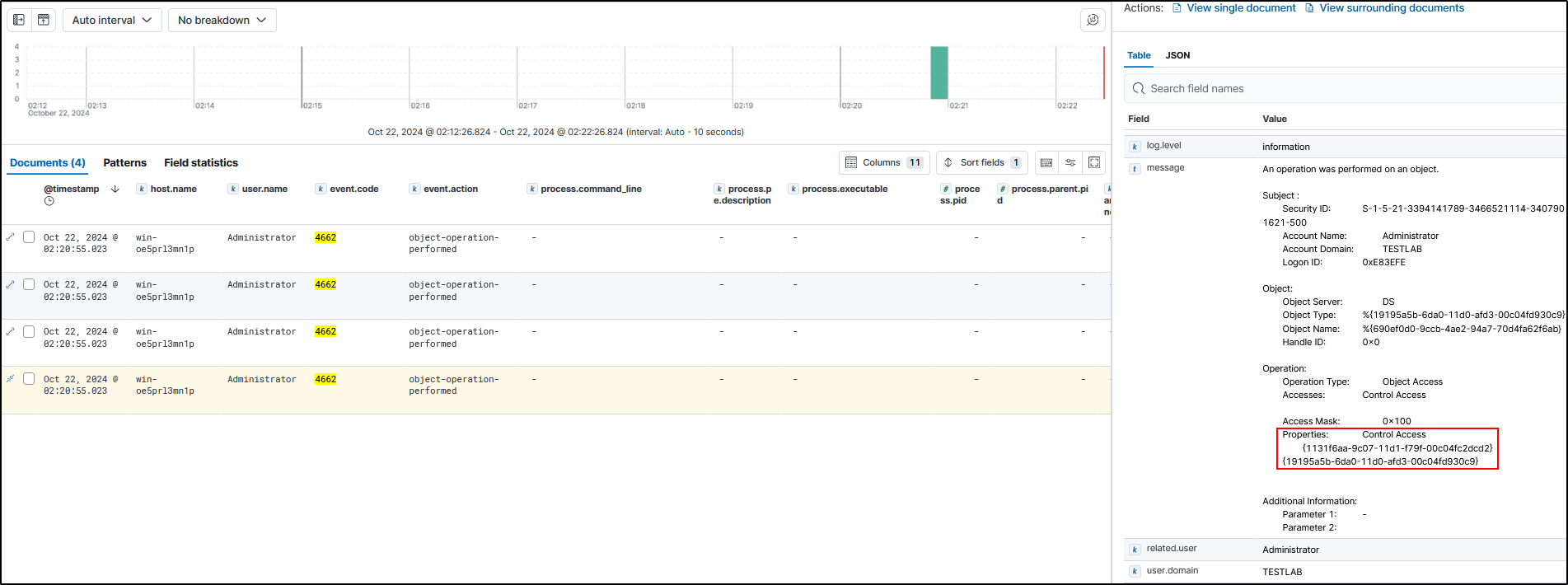
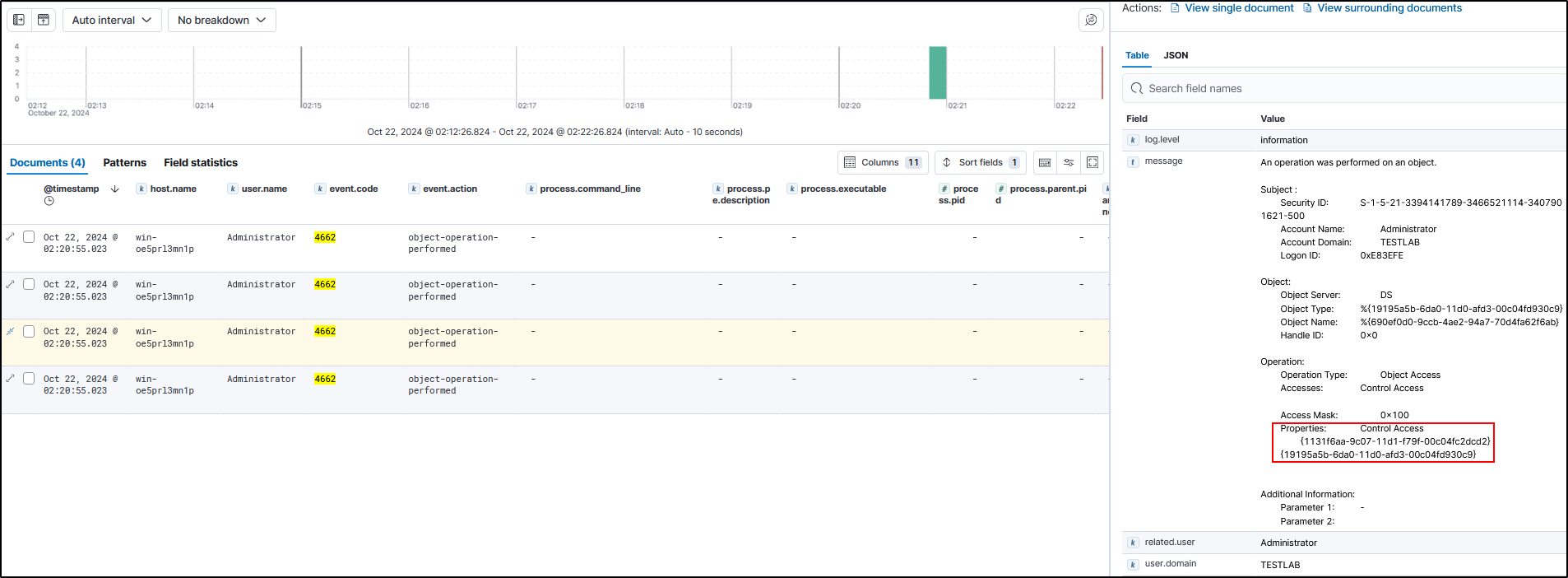
Log 3 will look very different, however. It will not have a GUID beginning with 1131f6a and instead will have 89e95b76-444d-4c62-991a-0facbeda640c which is DS-Replication-Get-Changes-In-Filtered-Set.
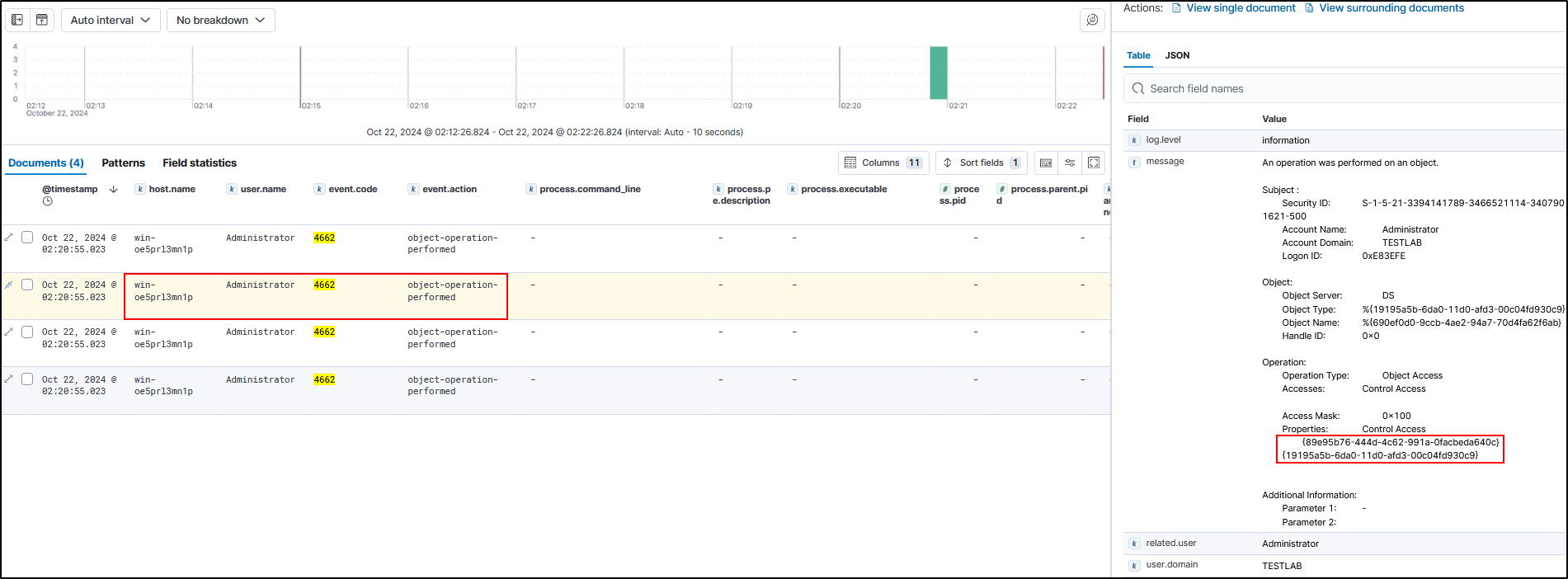
Log 4 will look very similar to Logs 1 & 2, but it will have a slightly different GUID. It will have a GUID of 1131f6ad-9c07-11d1-f79f-00c04fc2dcd2 which is DS-Replication-Get-Changes-All.
Bonus Notes
When performing a DCSync attack from outside of a domain controller, packets will be sent over the DCERPC, EPM, and DRSUAPI protocols.
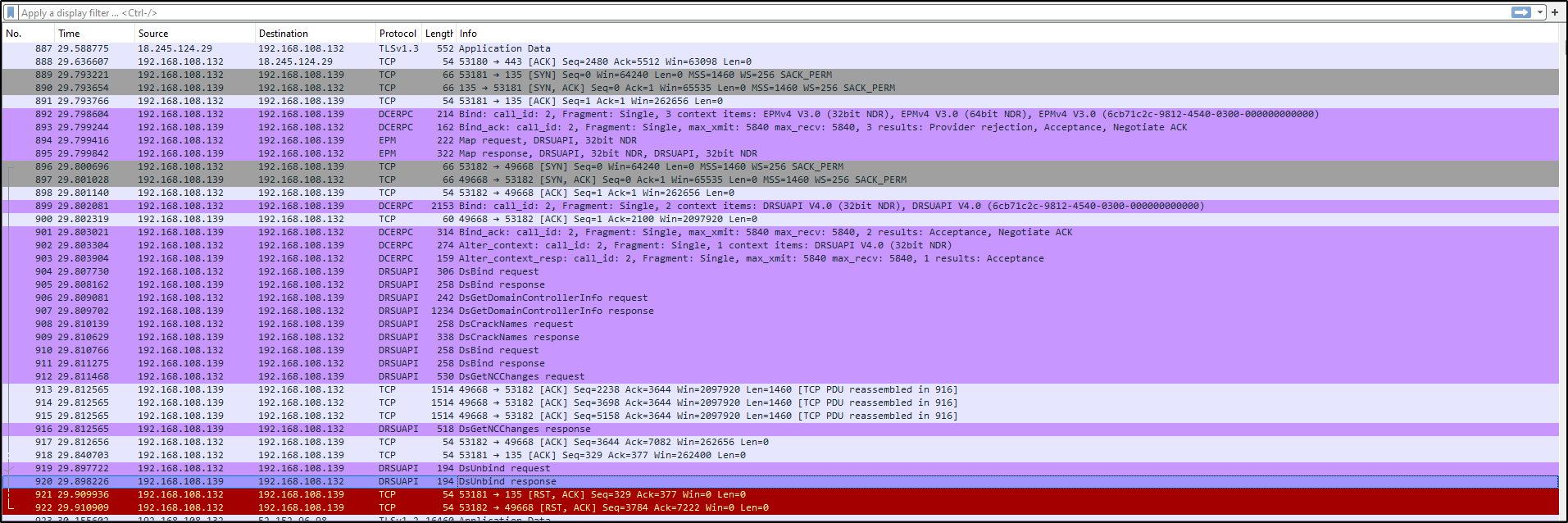
However, if you execute a DCSync attack while on a domain controller, it will perform everything locally with the domain controller and no packets with the protocols mentioned above will be sent.
Detecting Netexec’s DCSync
There are 3 methods of performing a dcsync with netexec. 1. Using drsuapi to sync a single user, 2. ntdsutil.exe 3. vss.
-
Drsuapi to sync a single user
The command to DCSync a single user with Netexec over the Drsuapu protocol is:
nxc smb 192.168.108.139 -u Administrator -d testlab.local -p 'P@ssw0rd' --ntds --user krbtgt
When using netexec to dump a specific user, it was generate 3 event id 4662 logs. The first 2 will have a normal GUID of
1131f6aa-9c07-11d1-f79f-00c04fc2dcd2, which is DS-Replication-Get-Changes.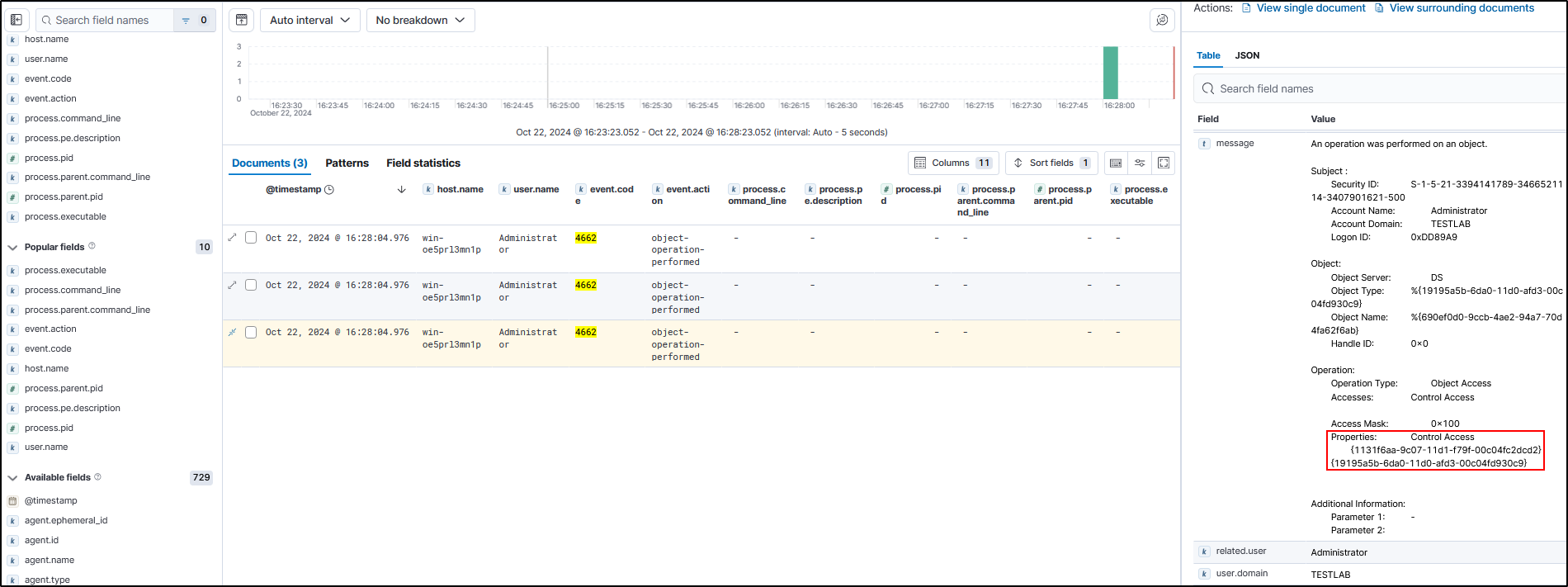
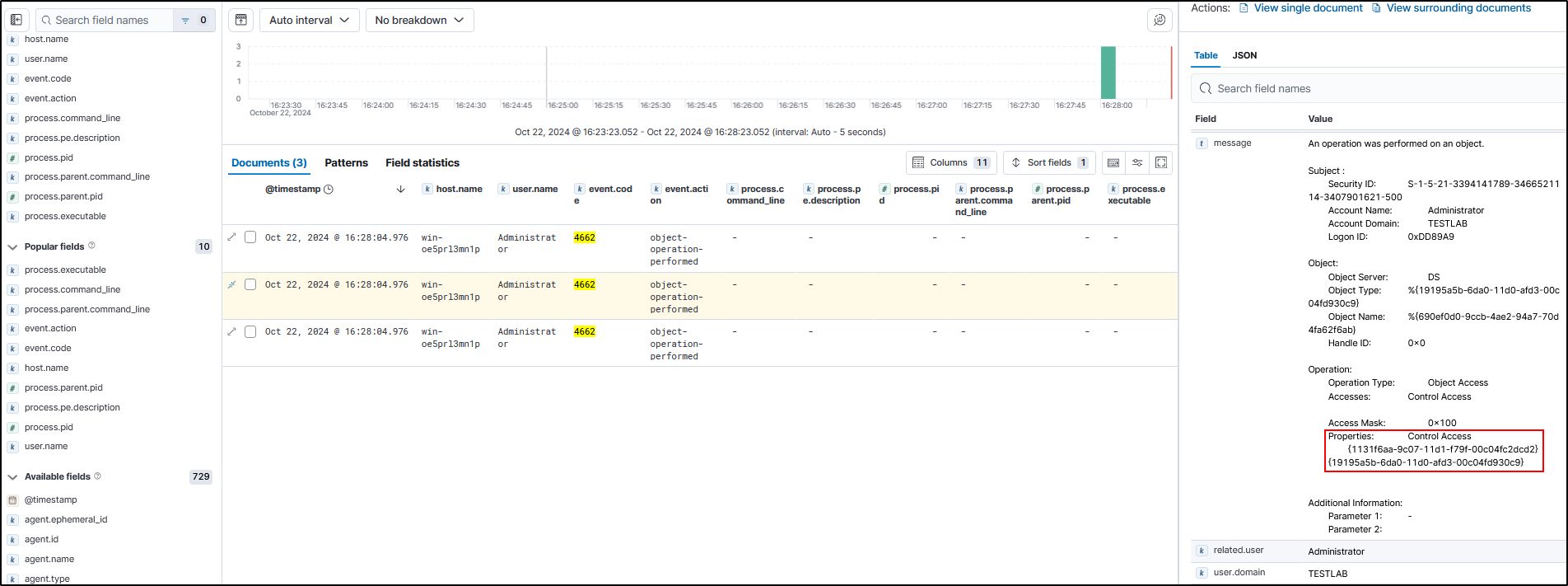
However the third generated log will have a GUID of
1131f6ad-9c07-11d1-f79f-00c04fc2dcd2which is DS-Replication-Get-Changes-All.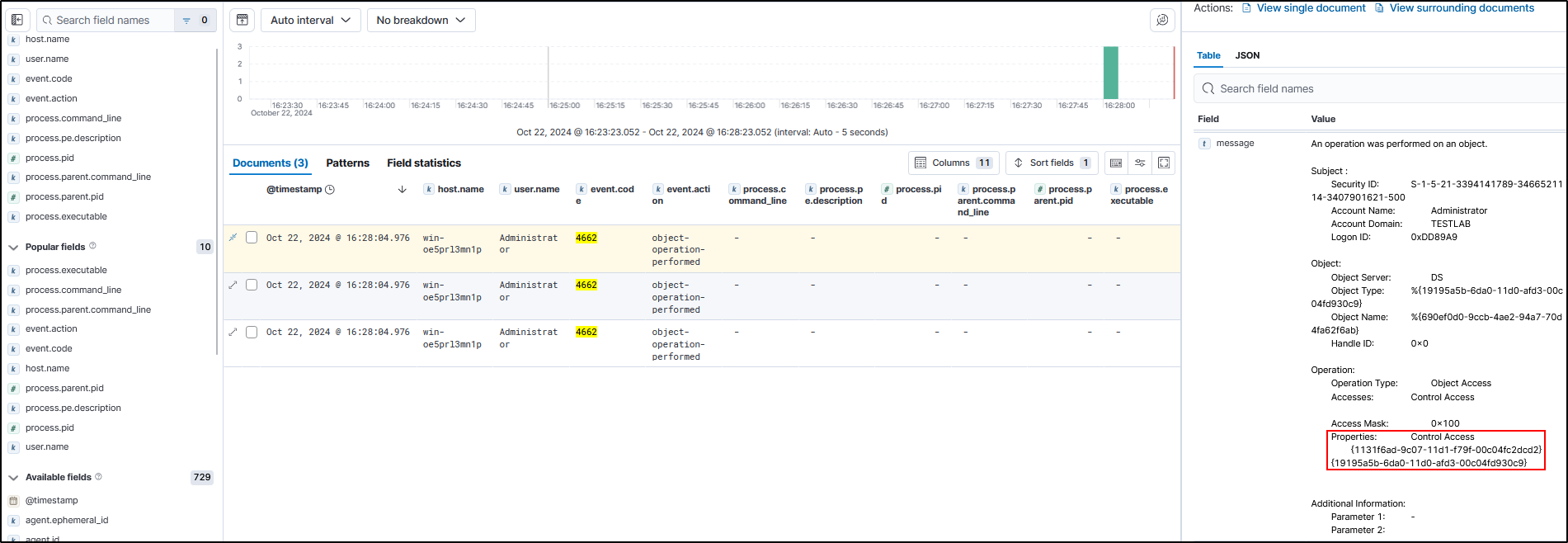
Again we can look for non domain controller machine accounts too, just like the Mimikatz detection.
-
ntdsutil.exe
Netexec can perform a DCSync by using the LOLBIN (living off the land binary)
ntdsutil.exe. ntdsutil.exe is not a common utility run on the environment. It does not blend in with day to day activities.nxc smb 192.168.1.100 -u UserName -p 'PASSWORDHERE' -M ntdsutil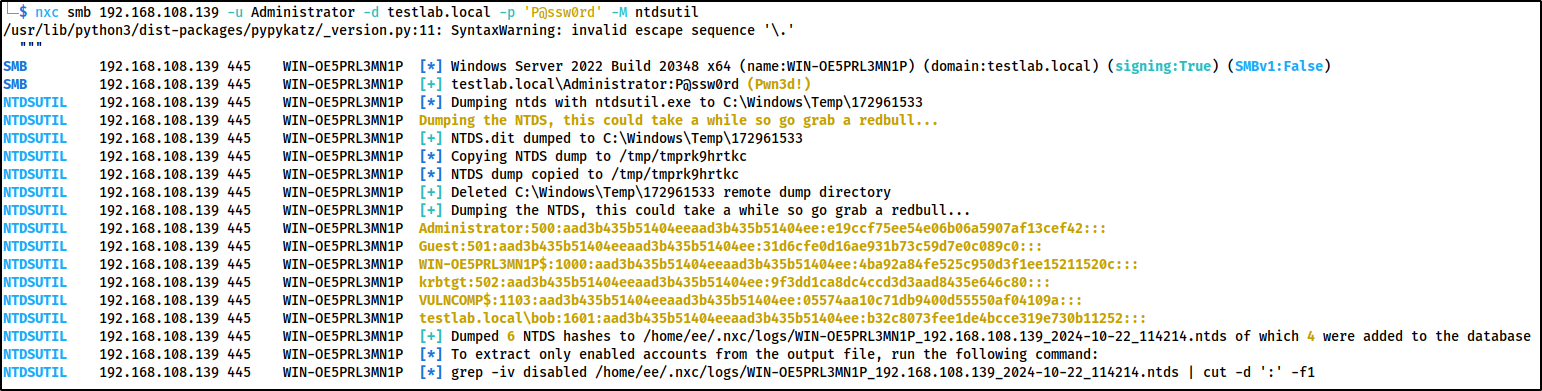
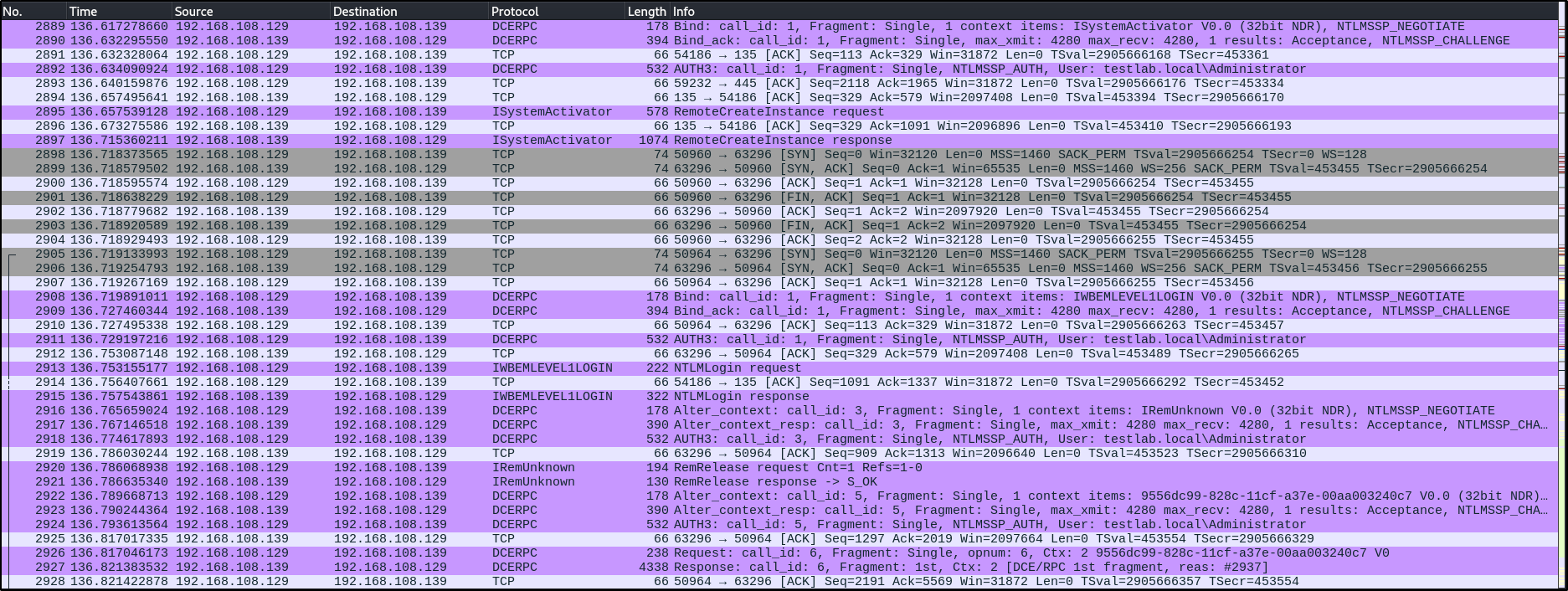
This is the chain of events when running when running the -M ntdsutil command. To detect this we can look for process creation with event id 1 and the process.command_line as any of the below.
 cmd.exe /Q /c powershell "ntdsutil.exe 'ac i ntds' 'ifm' 'create full C:\Windows\Temp\172963876' q q" 1> \Windows\Temp\QuGPmj 2>&1
 powershell "ntdsutil.exe 'ac i ntds' 'ifm' 'create full C:\Windows\Temp\172963876' q q"
 "C:\Windows\system32\ntdsutil.exe" "ac i ntds" ifm "create full C:\Windows\Temp\172963876" q q
 cmd.exe /Q /c rmdir /s /q C:\Windows\Temp\172963876 1> \Windows\Temp\vofITR 2>&1
The first command executes the second which executes the third. The third created a directory called
172963876inC:\Windows\Tempand standard out was sent to a random file calledvofITRwith the following content below.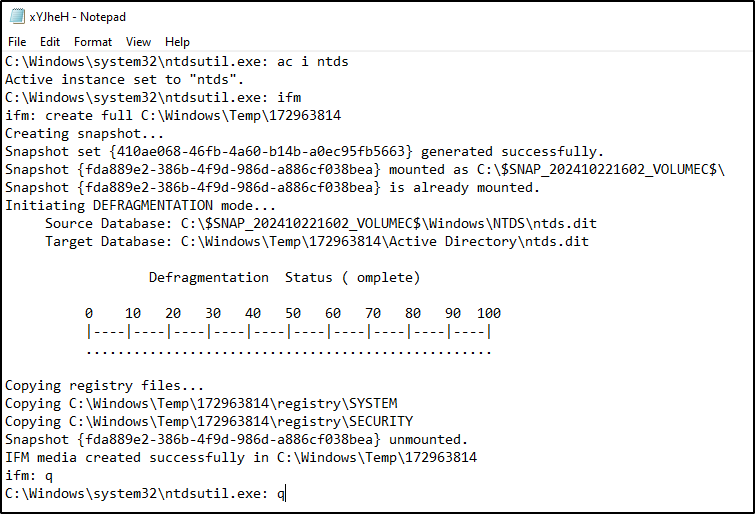
This file then gets deleted with the rmdir command, and another file gets created in its place. Additionally, the
172963876directory contains the ntds.dit and the SECURITY and SYSTEM registry keys. This entire directory will be deleted shortly after.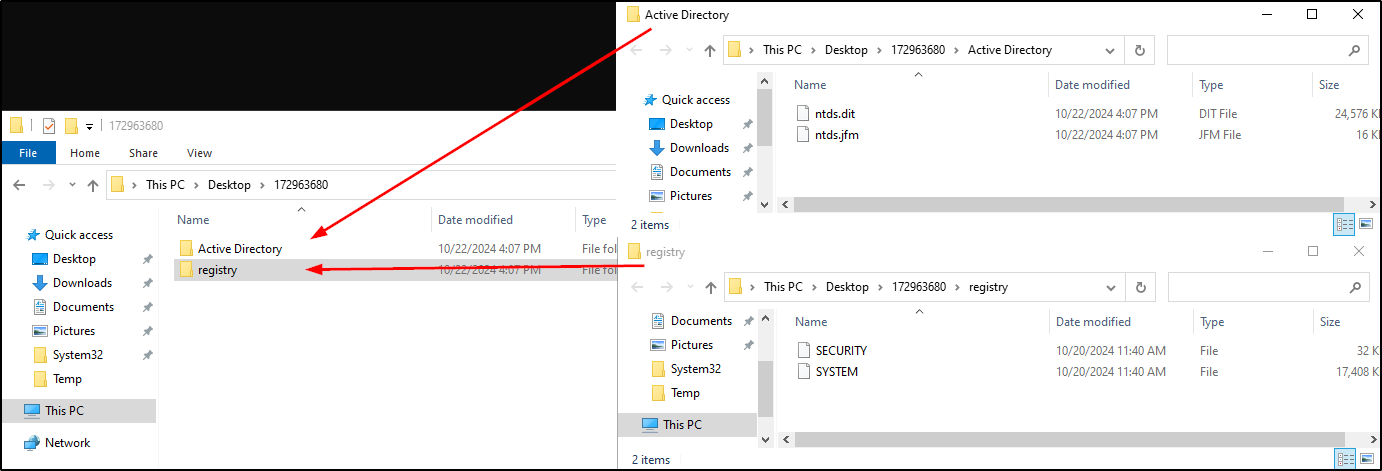
After the command is finished running, we will have the .tmp file and the new file with no extensions remaining. Both of these will have no contents in them.
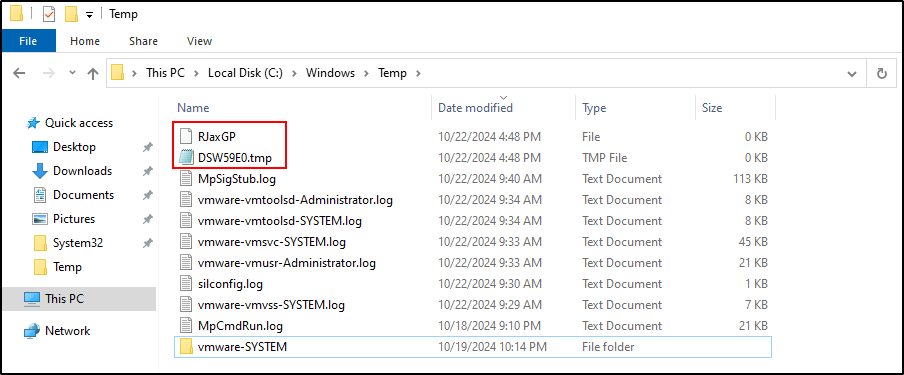
Lastly, there will be lots of event id
4799logs generated on the domain controller. With the process executable of eitherC:\Windows\System32\ntdsutil.exeorC:\Windows\System32\VSSVC.exe.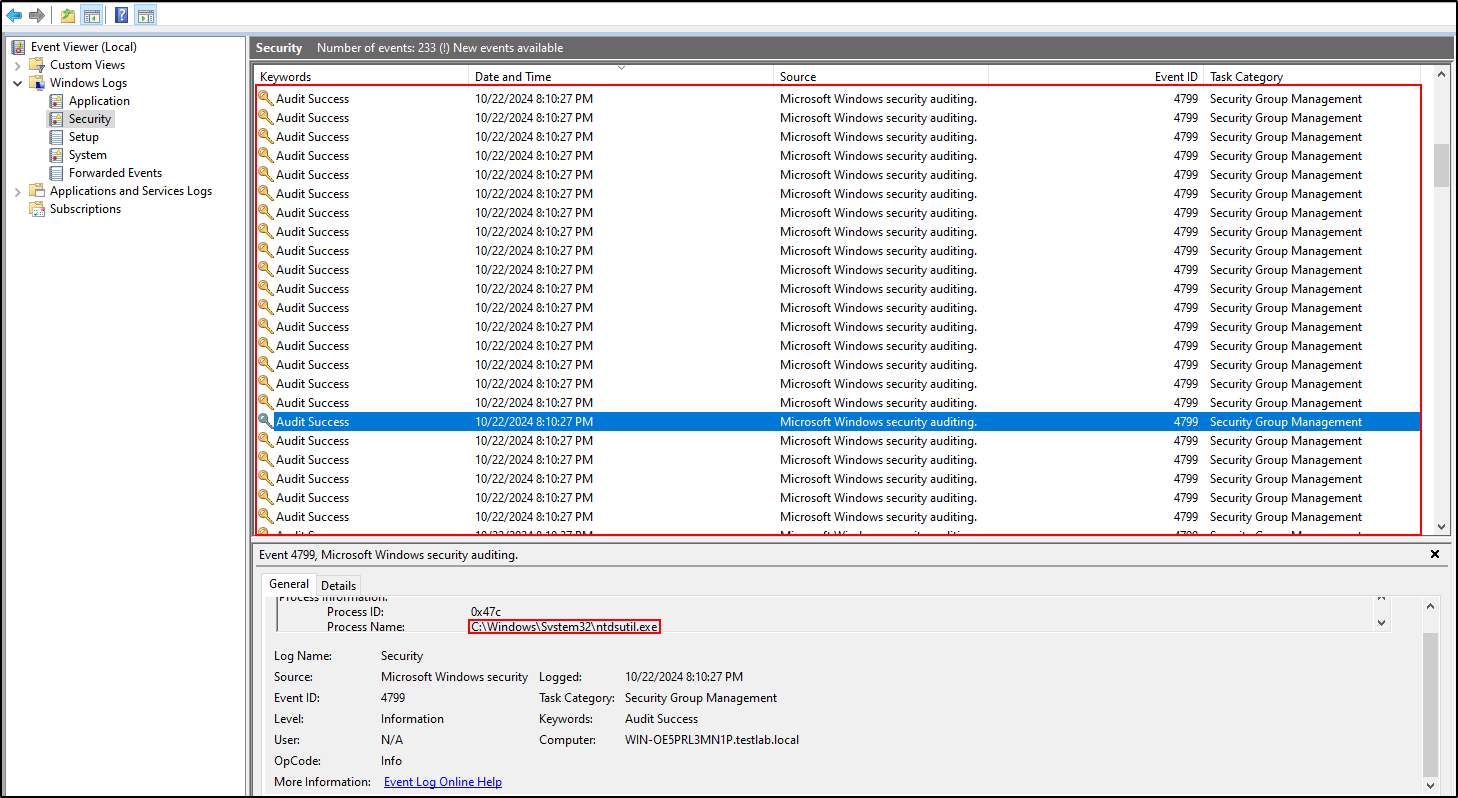
-
Volume Shadow Copy Service (VSS)
Lastly Netexec has an option to dump
ntds.ditwith the volume shadow copy service (VSS) using the following command:nxc smb 192.168.108.139 -u 'Administrator' -d testlab.local -p 'P@ssw0rd' --ntds vss`
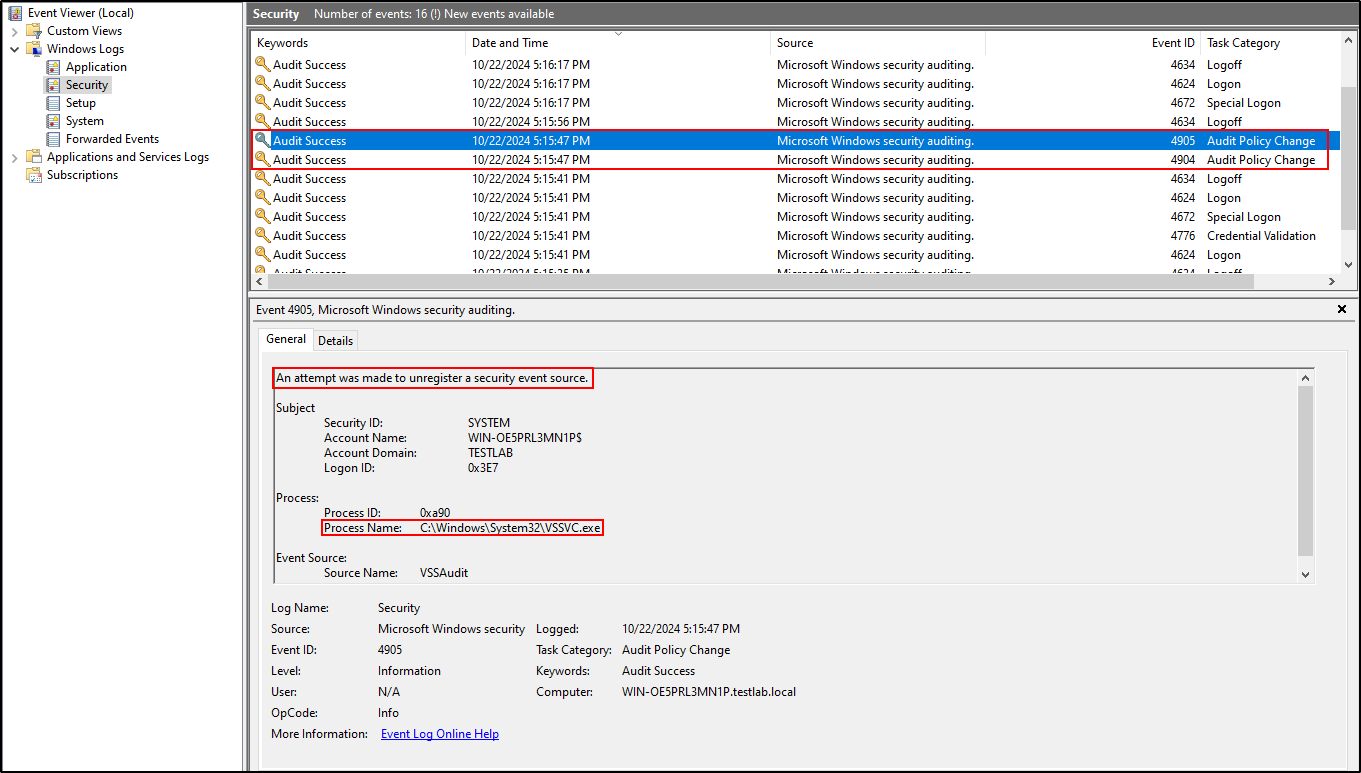
Running this command will generate 2 logs. One event id
4904and one4905. The process executable will beC:\Windows\System32\VSSVC.exe.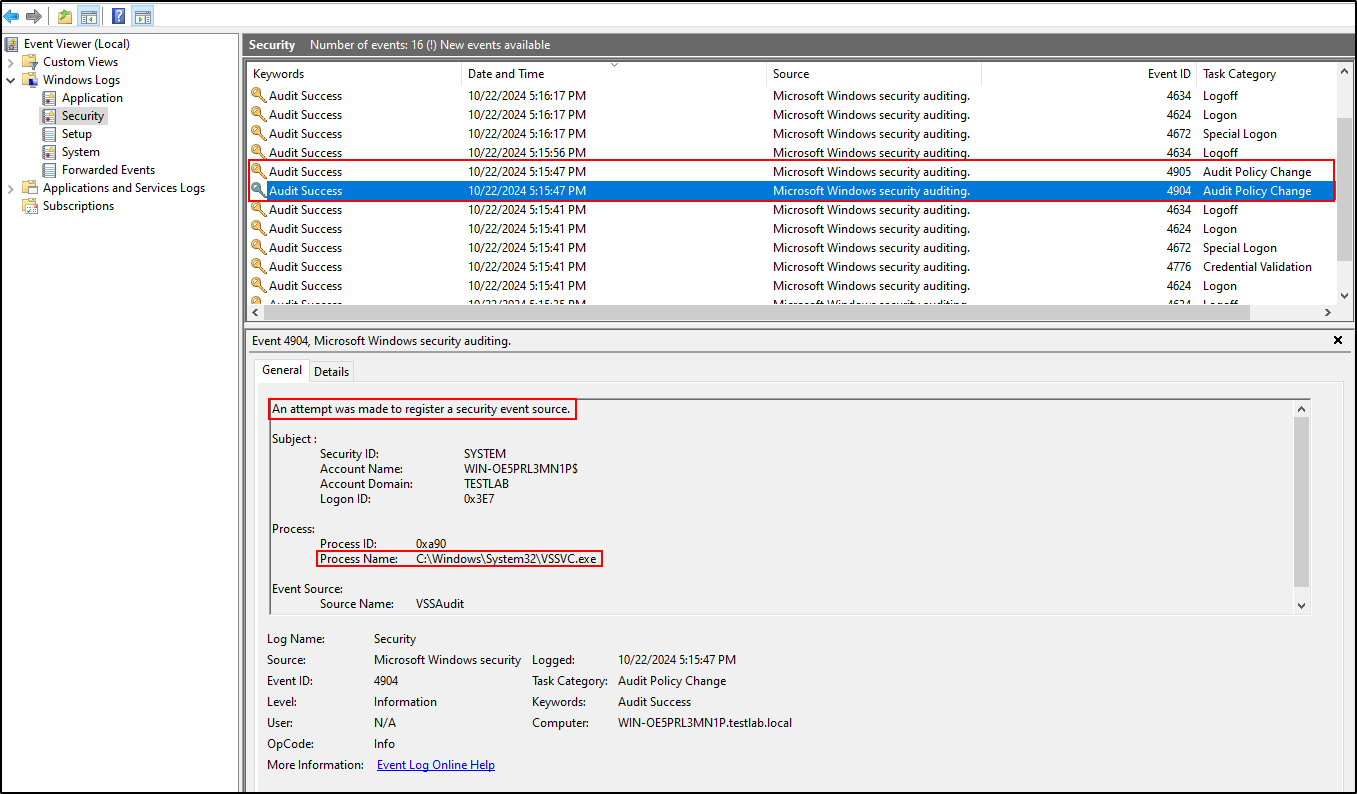
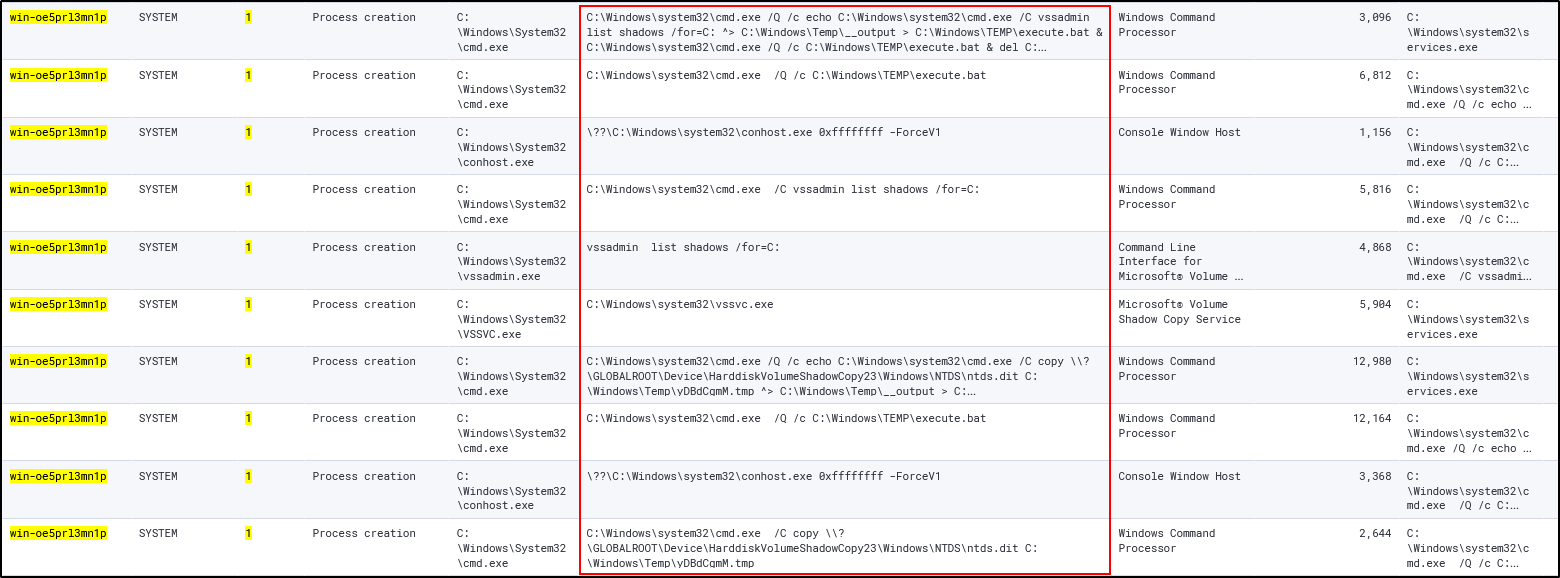
Netexec will run this command on the box:
C:\Windows\system32\cmd.exe /Q /c echo C:\Windows\system32\cmd.exe /C vssadmin list shadows /for=C: ^> C:\Windows\Temp\__output > C:\Windows\TEMP\execute.bat & C:\Windows\system32\cmd.exe /Q /c C:\Windows\TEMP\execute.bat & del C:\Windows\TEMP\execute.batThen it will also run this command to copy the the shadow copy to C:\Windows\Temp
C:\Windows\system32\cmd.exe /C copy \\?\GLOBALROOT\Device\HarddiskVolumeShadowCopy23\Windows\NTDS\ntds.dit C:\Windows\Temp\yDBdCgmM.tmpWe can build a command line detection with the process command lines shown above and event code 1
Final DCSync detections:
-
Rule Name: Single User DCSync - Mimikatz or Netexec
Detection Query:
event.code:"4662" AND (NOT message:"*1131f6aa-9c07-11d1-f79f-00c04fc2dcd2*" OR user.name NOT LIKE "*$")Rule Description: This alert is the result of an event log id 4662 DCSync directory replication that doesn’t come from a machine account name, OR has a GUID in the properties not equal to
1131f6aa-9c07-11d1-f79f-00c04fc2dcd2 -
Rule Name: Netexec Ntdsutil DCSync Module - Anomalous Event Logs
Detection Query:
event.code:"4799" and (winlog.event_data.CallerProcessName:"C:\\Windows\\System32\\ntdsutil.exe" or winlog.event_data.CallerProcessName:"C:\\Windows\\System32\\VSSVC.exe")Rule Description: This alert is the result of detected event logs that align with Netexec’s ntdsutil module to perform a DCSync attack by looking for event id 4799 with the process executable name of C:\Windows\System32\ntdsutil.exe or C:\Windows\System32\VSSVC.exe
-
Rule Name: Netexec Ntdsutil DCSync Module - Command Line Detection
Detection Query:
event.code:"1" and ((message:"*cmd.exe /Q /c powershell \"ntdsutil.exe 'ac i ntds' 'ifm' 'create full C:\\Windows\\Temp\\*" and message:" q q\" 1> \\Windows\\Temp\\*" and message:"*2>&1*") or (message:"*powershell \"ntdsutil.exe 'ac i ntds' 'ifm' 'create full C:\\Windows\\Temp\\*" and message:"*' q q\"*") or (message:"*\\\"C:\\Windows\\system32\\ntdsutil.exe\\\" \\\"ac i ntds\\\" ifm \\\"create full C:\\Windows\\Temp\\*" and message:"*\\\"q q") or (message:"*cmd.exe /Q /c rmdir /s /q C:\\Windows\\Temp\\*" and "*1> \\Windows\\Temp\\*" and "*2>&1*"))Rule Description: This is another alert as a result of Netexec’s ntdsutil module to perform a DCSync attack by looking for process creation with event id 1 and the process.command_line as any of the below:
cmd.exe /Q /c powershell "ntdsutil.exe 'ac i ntds' 'ifm' 'create full C:\Windows\Temp\*' q q" 1> \Windows\Temp\* 2>&1 powershell "ntdsutil.exe 'ac i ntds' 'ifm' 'create full C:\Windows\Temp\*' q q" "C:\Windows\system32\ntdsutil.exe" "ac i ntds" ifm "create full C:\Windows\Temp\*" q q cmd.exe /Q /c rmdir /s /q C:\Windows\Temp\* 1> \Windows\Temp\* 2>&1 -
Rule Name: Netexec Ntds VSS Option - Command Line Detection
Detection Query:
event.code:"1" and (message:"*C:\\Windows\\system32\\cmd.exe /Q /c echo C:\\Windows\\system32\\cmd.exe /C vssadmin list shadows /for=C: ^> C:\\Windows\\Temp\\__output > C:\\Windows\\TEMP\\execute.bat & C:\\Windows\\system32\\cmd.exe /Q /c C:\\Windows\\TEMP\\execute.bat & del C:\\Windows\\TEMP\\execute.bat*" or message:"*C:\\Windows\\system32\\cmd.exe /Q /c C:\\Windows\\TEMP\\execute.bat*" or message:"*C:\\Windows\\system32\\cmd.exe /C vssadmin list shadows /for=C:*" or message:"*vssadmin list shadows /for=C:*" or message:"*C:\\Windows\\system32\\vssvc.exe*" or (message:"*C:\\Windows\\system32\\cmd.exe /Q /c echo C:\\Windows\\system32\\cmd.exe /C copy \\\\?\\GLOBALROOT\\Device\\HarddiskVolumeShadowCopy23\\Windows\\NTDS\\ntds.dit C:\\Windows\\Temp\\*" and message:"*C:\\Windows\\Temp\\__output > C:\\Windows\\TEMP\\execute.bat & C:\\Windows\\system32\\cmd.exe /Q /c C:\\Windows\\TEMP\\execute.bat & del C:\\Windows\\TEMP\\execute.bat*") or message:"*C:\\Windows\\system32\\cmd.exe /Q /c C:\\Windows\\TEMP\\execute.bat*" or message:"*C:\\Windows\\system32\\cmd.exe /C copy \\\\?\\GLOBALROOT\\Device\\HarddiskVolumeShadowCopy23\\Windows\\NTDS\\ntds.dit C:\\Windows\\Temp\\*")Rule Description: This alert is the result of Netexec’s VSS option to perform a DCSync attack by looking for process creation with event id 1 and the process.command_line as any of the below:
C:\Windows\system32\cmd.exe /Q /c echo C:\Windows\system32\cmd.exe /C vssadmin list shadows /for=C: ^> C:\Windows\Temp\__output > C:\Windows\TEMP\execute.bat & C:\Windows\system32\cmd.exe /Q /c C:\Windows\TEMP\execute.bat & del C:\Windows\TEMP\execute.bat C:\Windows\system32\cmd.exe /C copy \\?\GLOBALROOT\Device\HarddiskVolumeShadowCopy23\Windows\NTDS\ntds.dit C:\Windows\Temp\*.tmp -
Rule Name: Netexec Ntds VSS Option - Event Log Detection
Detection Query:
(event.code: 4904 OR event.code: 4905) AND process.executable: "C:\\Windows\\System32\\VSSVC.exe"Rule Description: This is another alert as a result of Netexec’s VSS option to perform a DCSync attack by looking for generated event logs ID
4904and4905with process executable name ofC:\Windows\System32\VSSVC.exe
Detecting Pass-The-Hash
We dumped LSASS with Mimikatz using
sekurlsa::logonPasswords full
-
Got the hash of the DC:
217e50203a5aba59cefa863c724bf61b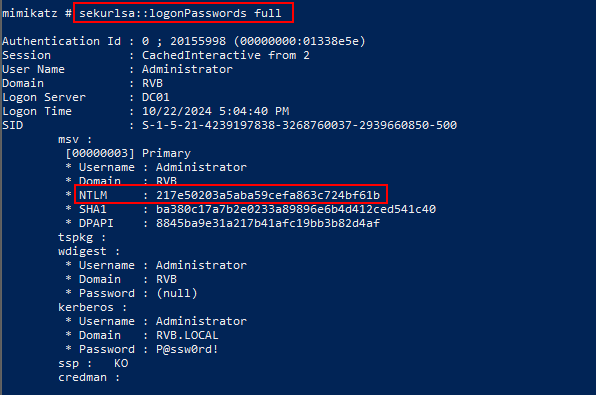
-
To perform the PTH attack, we ran the command
sekurlsa::pth /user:Administrator /domain:RvB.local/ntlm:217e50203a5aba59cefa863c724bf61b -
We then were able to get a root shell on the Domain Controller authenticating as the Administrator account, as shown by the command prompt
whoami /usercommand.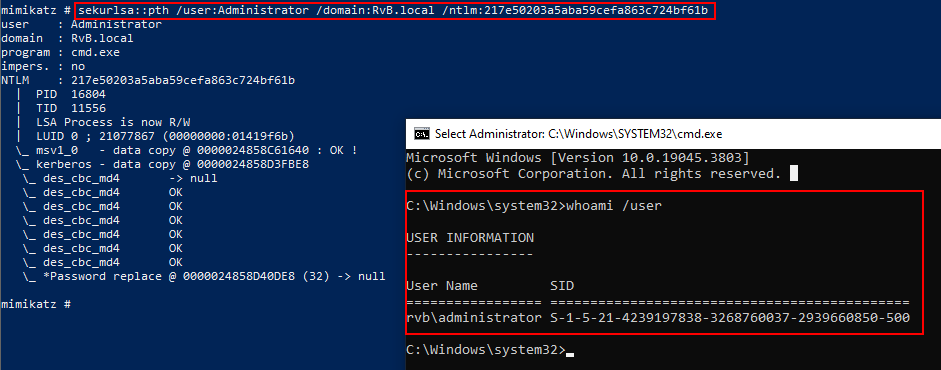
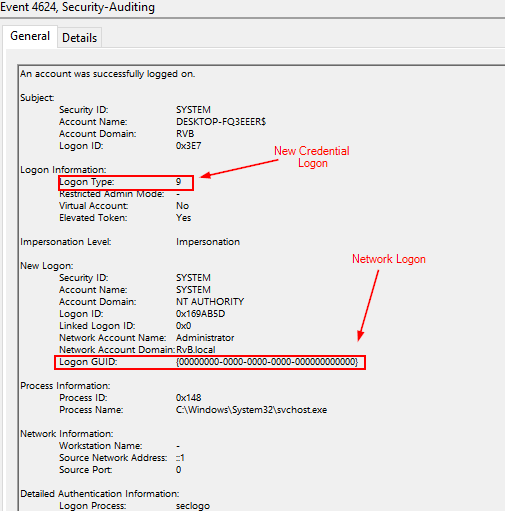
- Event ID 4624 (Successful Account Logon)
- Logon Type: 9 (NewCredentials): This logon type shows that credentials were used to create a new session without re-authenticating. Mimikatz abuses this type to inject credentials into a session, allowing attackers to impersonate other users or escalate privileges.
-
Logon GUID: All zeros: The absence of a valid GUID indicates that this logon was network-based and not linked to a direct interactive session. This is typical of pass-the-hash or pass-the-ticket techniques, where an attacker uses stolen credentials without the original logon process.
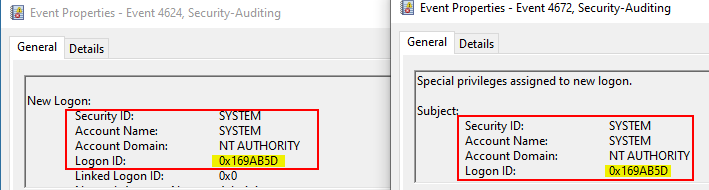
- Event ID 4624 (Successful Account Logon):
- This event confirms that a logon occurred successfully, with the SYSTEM account being used, as seen from the Security ID and Account Name.
- The Logon ID of 0x169AB5D identifies this specific logon session. This is a key to track because it links all actions associated with this logon.
- Event ID 4672 (Special Privileges Assigned to New Logon):
- This event occurs when special privileges, such as SeTcbPrivilege or SeDebugPrivilege, are assigned during the logon process. These privileges are typical for high-level accounts like SYSTEM or Administrator.
- The Logon ID is 0x169AB5D, matching the logon ID from Event 4624. This direct correlation indicates that the same logon session (likely using a hash) was granted elevated privileges.
By correlating Event ID 4624 and Event ID 4672 using the shared Logon ID (0x169AB5D), it is clear that the logon session gained special privileges. This suggests that the Pass-the-Hash attack was successful, where the we used the NTLM hash of a privileged account to gain access and escalate privileges, as evidenced by the special privileges being assigned
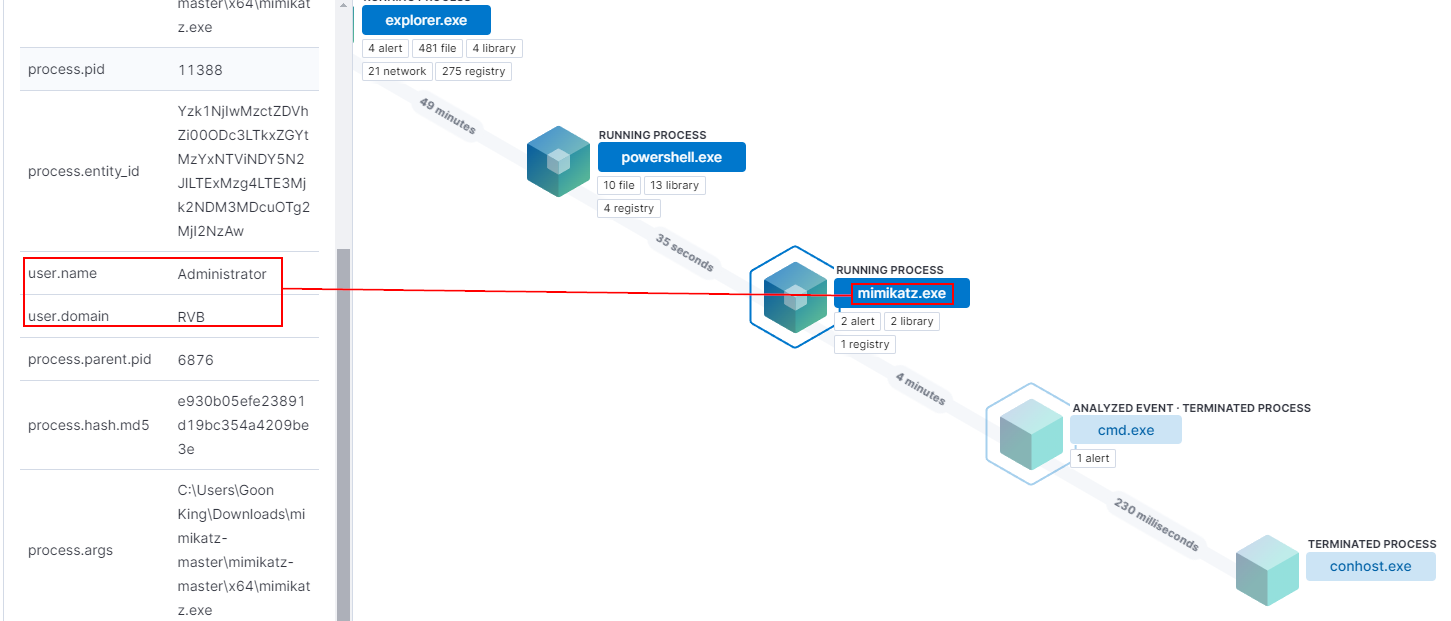
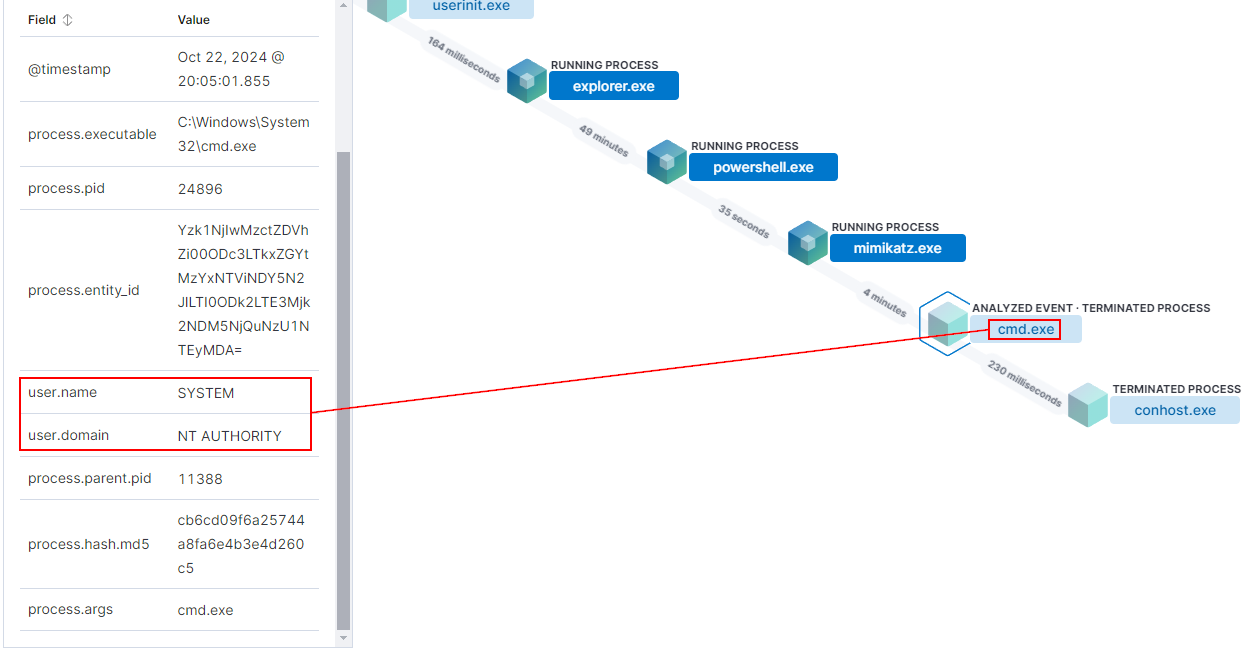
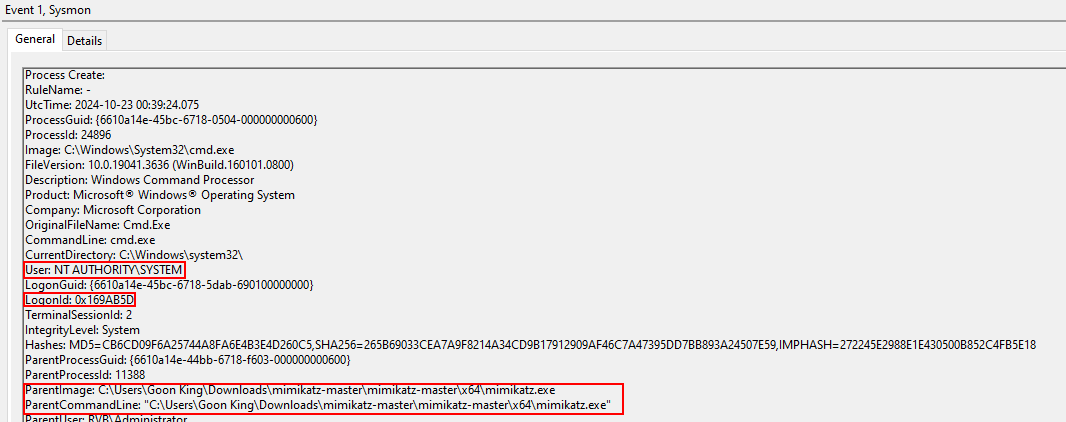
This Sysmon Event ID 1 log shows the cmd.exe process running Mimikatz with SYSTEM-level privileges:
- Process: cmd.exe was used, spawned by Mimikatz.exe from the user’s Downloads folder.
- User: The process ran under NT AUTHORITY\SYSTEM, confirming elevated privileges.
- Logon ID (0x169AB5D): This links to the previous session where credentials were stolen using Mimikatz.
-
Parent Process: Mimikatz.exe, indicating manual execution of the tool.
1. PowerShell Execution
- PowerShell.exe was executed under the Administrator account.
2. Mimikatz Execution
- Mimikatz.exe was initiated directly after PowerShell, which is an indicator for credential dumping. The 4-minute execution window indicates the “attacker” was extracting credentials from memory.
3. Command Prompt Execution (cmd.exe)
- Following Mimikatz, cmd.exe ran under the SYSTEM account, signaling privilege escalation.
4. conhost.exe Termination
- conhost.exe termination marks the close end of the SYSTEM session.
Detection Query:
winlog.event_id: ("4624" and "4672") and winlog.event_data.LogonProcessName: "seclogo"
Rule Description:
Potential Pass-The-Hash / Credential Abuse
- Event ID 4624: Successful logon.
- Event ID 4672: Special privileges assigned to the logged-in user.
- LogonProcessName: “seclogo”: Indicates the logon used NTLM for network-based authentication.
This flags events where a privileged account logs in over a network and is immediately granted elevated rights, which can indicate credential abuse or attack.